E-mu 1820 and Ubuntu
I have finally managed to get some use out of my E-mu card! For months this was lying dormant because it was installed on an old 1ghz 512MB ram Windows box which was retired in favour of a 2.5ghz Quad Core with 4GB Ram.
Updated: see bottom of page for Ubuntu 10.10 experience.
Updated: see bottom of page for Ubuntu 12.04 LTS experience.
When I moved to the new PC, I decided to go with Ubuntu as main (and only) operating system. I wanted to see just how far I could get with free software. I also love a challenge…
So that’s enough background. Getting the E-mu 1820 working with Ubuntu has not been easy, and there are still a few niggles/limitations, but these don’t seem to be too much of a hindrance.
Caveat: these are not step by step instructions, these are a rough description of how it is working at the moment.
The Hardware
I have a E-mu 1010 card and a 1820 audio dock. The card is basically built on the Audigy chipset, but I’ll not go into that here as there is plenty of detail elsewhere on the web about that.
Installing was straight forward; I simply plugged everything into the motherboard and connected the internal power cable from the power supply to the 1010 card to power the audiodock.
The Software
This is where it gets interesting.
I should probably have documented each step as I took it, but as this has been worked on over several weeks – in snatches of spare time – using a rather empirical method, this description of how it is working now is the best I have for you.
Karmic Koala (9.10) is the Ubuntu version I am running.
I basically have the following path for most system wide audio operations (including flash which was a problem for a while):
hardware <- alsa <- jack <- pulseaudio <- non jack aware applications
hardware <- alsa <- jack <- jack aware applications
So starting at the bottom (the hardware is already in place):
Alsa
The first step was to see if the driver module for the emu10k1 was installed. In my system updating the firmware was one job which needed doing I downloaded and installed alsa-firmware-1.0.20 which included the necessary firmware for the audiodock.
Looking in my bash history, it seems I did this:
tar -xvjf alsa-firmware-1.0.20.tar.bz2
cd alsa-firmware-1.0.20/
cd emu/
gcc fw_writer.c
./a.out
sudo mkdir /lib/firmware/emu
sudo cp *.fw /lib/firmware/emu
sudo modprobe -r snd_emu10k1_synth
sudo modprobe -r snd_emu10k1
sudo modprobe snd_emu10k1
Jack
Setting up Jack was done as follows:
- Basic Jack package was installed, including dev packages
- Jack Pulse Audio sink was built from source using these instructions. (this solved flash audio playback)
- The default.pa was updated to use the jack sink only along with a little shell script as per these notes.
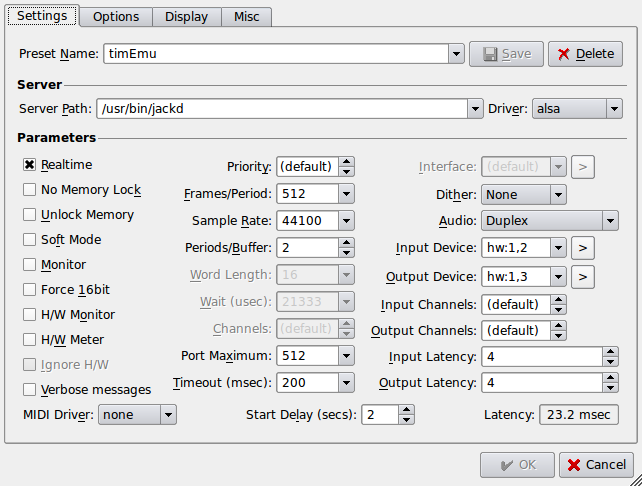
- the qjackctl application is used to setup and start the jack server. There follows an image showing my settings. Note that the hardware chosen are as follows:
- 1,2 Multichannel Capture/PT Playback
- 1,3 Multichannel Playback
- These settings were identified with the help of this post.
- I actually have an issue with the soundcards being recognised in a random order so sometimes 1,2 becomes 0,2 !!
Pulseaudio
Based on these notes(now offline), I have been able to setup pulse to my almost satisfaction. In light of the script I mention next, the unsetting of the autospawn option was very key. (try this link instead…)
One other thing that I do is have Qjackctl start pulseaudio for me using a little script which kills any running pulseaudio sessions before starting again. This means when there is a problem with Jack, I can restart as many times as necessary to get things back again, and pulseaudio will always restart as well.
The script contains these lines:
/usr/bin/pulseaudio -k && echo "Killed pulseaudio"
/usr/bin/pulseaudio -DnF /etc/pulse/default.pa && echo "Started pulseaudio"
Once I switched to using the jack sink, pulse audio has worked fine. The only niggle is that the default sink defaults to simultaneous despite my setting it otherwise, though I suspect that there is a way I could script that to fix it. This just means that my volume control on my keyboard has no effect until the jack sink is made the default output.
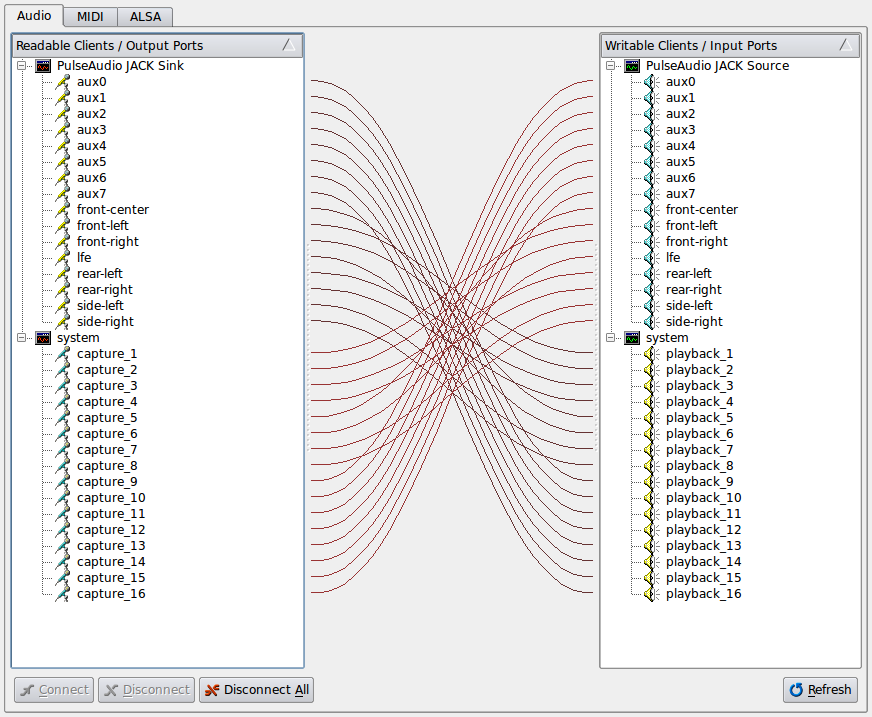
Here is an image of the pulseaudio jack sink in action:
Patching
Finally I had to work out what was connected to what. An evening of playing with alsamixer, jack, and some sample audio produced these Emu-mixernotes. This spreadsheet (here as a pdf) lists all the parts of the E-mu 1010 and 1820 that are visible in alsamixer, and attempts to identify their relation to the physical ouptuts and any other functionality.
Finally – not finally
I now have multichannel audio inputs and outputs, so can happily play with ardour, hydrogen. various synths, my condenser mic and the record player, to produce sound!!
However, MIDI is proving a challange at the moment. Although I can play some MIDI out of my Alesis SR-16, and can see the midiport lightup on my audiodock – I am not seeing any midi data make it through alsa. Update 30/12/2010: Ok so I have got MIDI in and out. Jack is configured with an alsa_seq (seq) driver for midi. Jack will then see ports 0 and 2 of the emu. 0 is output on the front panel, and 2 is the input on the rear of the audiodock.
Ubuntu 10.10
So I decided to risk upgrading to ubuntu 10.10. I decided to go for a clean install. (If you don’t already, make sure your /home filesystem is on a separate disk partition, makes a fresh install a breeze!)
Most things worked out of the box. Here is a list of the steps I took.
- Fresh install Ubuntu 10.10
- Downloaded latest alsa-firmware, compiled and installed.
- Made sure jackd was installed
(noticed that there is a jackd2 now, but Ardour currently does not work with that!) - Make sure pulse audio was installed (it is by default)
- Use apt-get to install the pulse-jack-sink/source modules
- Used my same scripts to launch qjackctl and pulse as per the details above.
- All done! And with no compiling of source. In fact I tried compiling the jack sink modules for pulse as per instructions above, and this did not work, but as the repository modules worked, I have just gone with them. Only down side is that MIDI on the EMU still does not work 🙁 .
Ubuntu 12.04 LTS
Finally decided to take the plunge and upgrade to 12.04 Precise Pangolin. And – surprise – pulseaudio (which ended up at version 1.1) didn’t work. Wouldn’t stay running even though it seemed to have loaded modules OK. I followed the instructions at this page, and ran the following commands:
 sudo add-apt-repository ppa:ubuntu-audio-dev
 sudo apt-get update
 sudo apt-get dist-upgrade
After that, I now had version PulseAudio2.
I then stopped and started jack via qjackctl, and pulseaudio stayed running.
But at this point I still had no audio, and it looked like this was because the jack sink module wasn’t loaded. I had taken a backup of my pulse config files before running the upgrade commands above, so was able to copy back the jack sink lines. Then restarted everything via qjackctl again, and this time I can select the jack sinc in the sound settings.
Now all I need to do is remap my keyboard multimedia keys, but that can wait – I can at least hear music!
A command that was useful for verifying things were present and (maybe) correct:
wget http://www.alsa-project.org/alsa-info.sh -O alsa-info.sh && bash alsa-info.sh
Additional info
Thanks to Steven who provided the following additional tip:
If media is playing faster than normal (ergo 44.1 vs. 48 khz).
This https://bugs.launchpad.net/ubuntu/+source/alsa-driver/+bug/480010
Got to the problem, and the solution (for me) was to add:default-sample-rate = 48000into /etc/pulse/daemon.conf .